
SQL SERIES Part I: Introduction to the Basics of SQL
- Cascade
- Jul 22, 2023
- 4 min read

About 2.5 quintillion bytes of data are created each day and businesses go to head-to-head in a never-ending race to collect these data in order to transform them into cash flow. Data in itself is useless except it has gone through the Data Analysis Process (DAP). There are lot of ways to do this, but most data professionals including myself will tell you the bulk of the magic happens in SQL as the majority of the world's data is stored in databases.
Understanding Databases
In Excel, each spreadsheet represents a table, and each row represents a record, while each column represents a field or attribute. Similarly, in a database, you have tables that store related data. Each table consists of rows, which are also known as records or tuples, and columns, which represent the attributes or fields of the data. However, unlike Excel, databases can handle much larger amounts of data and are designed for efficient storage and retrieval.
A database can be thought of as a bunch of MS Excel spreadsheets all sitting in one place without the 1,048,576 rows limit of Excel.
Databases provide additional features and functionalities that make them more powerful than spreadsheets. They are far more sophisticated, scalable, and secure systems designed to handle large volumes of data and support various data operations in a multi-user environment.
Entity-Relationship Diagram
Imagine Jack Sparrow without his compass—a fearless pirate lost at sea, drifting aimlessly with no sense of direction. Just like Jack, a business data analyst without an Entity-Relationship Diagram (ERD) is sailing into treacherous waters without a reliable map. The ERD serves as the compass of data analysis, guiding analysts through the intricate web of relationships within a database.
An ERD is a visual representation of the relationships between tables in a database. These diagrams typically contain:
a. The names of the table or entities,
b. The columns in each table,
c. The way data flows between the tables.
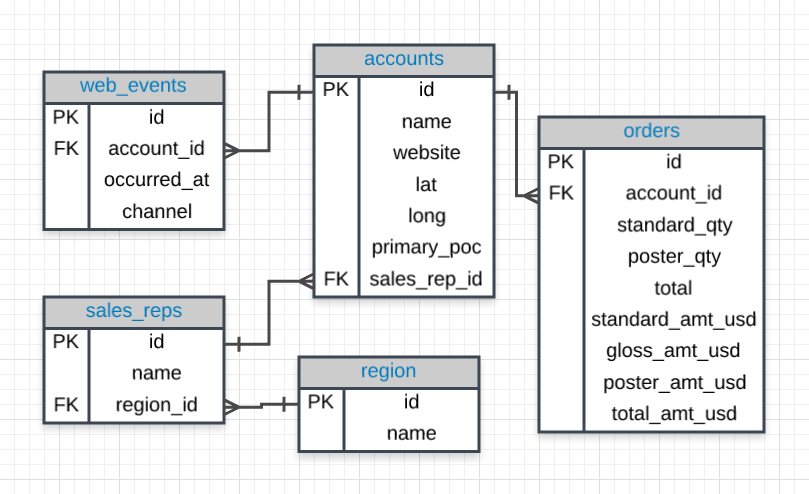
In the ERD above, each box is a table and the lines containing them shows the relationship between tables. Each entity has attributes (or columns) that define the specific data elements it holds.
Why SQL?
SQL, or Structured Query Language, is the universal language of databases. It has a variety of functions that allow its users to read (access), insert, update, and delete data irrespective of the Database Management System (DBMS). SQL's versatility, simplicity and readability and seamless data retrieval capabilities amongst other incredible potions has made it the trusty magic wand for data wizards all over the world.
Today, SQL is one of the most common languages for interacting with data.
It is also a declarative language, meaning that it specifies what needs to be done, not how to do it! This declarative nature of SQL makes it powerful and very flexible. Data wizards can focus on the task ahead instead of getting distracted with the "how" with working with data.
The Wizard's Scroll: Introduction to SQL Queries
Can you try to decipher what this piece of SQL query will do?
SELECT name, age, profession
  FROM wizards
 WHERE house = 'Gryffindor'
 ORDER BY age DESC
 LIMIT 5;
It looks just like written English sentences, right? Exactly! SQL is easy on the eyes unlike other languages. Don't worry if you can't figure how what this query does, we are going on a short journey - one of discovery and mastery as we unlock the door to the database realm.
To get started with SQL, we need to understand the building blocks:
SELECT:   Used to retrieve data from one or more tables.
FROM:     Specifies the table(s) from which to retrieve data.
WHERE:    Filters the data based on specified conditions.
ORDER BY: Sorts the result set based on specified columns. It is set to ascending (ASC) by default, you can set it to descending using DESC.
LIMIT:    Limits the number of rows returned. It is usually followed by a number that specifies the exact number of rows to display.
NB: The SELECT * is the shorthand of the SELECT all columns in a table.
Remember the example from earlier, let's see how close you got:
In the example, we're querying the "wizards" table to collect the names, ages, and professions of wizards belonging to the 'Gryffindor' house. Let's do a line-by-line analysis:
SELECT name, age, profession This clause specifies the columns we want to retrieve from the table. In this case, we're interested in the "name," "age," and "profession" columns.
FROM wizards Here, we indicate the table we're querying, which is "wizards."
WHERE house = 'Gryffindor': This clause filters the results based on a condition. We're selecting only the wizards whose "house" column value is 'Gryffindor'.
ORDER BY age DESC: This clause sorts the results in descending order based on the "age" column. The "DESC" keyword indicates a descending order.
LIMIT 5: Finally, we use the LIMIT clause to restrict the number of rows returned to 5. This ensures that we only retrieve the top 5 results. So, the query will retrieve the names, ages, and professions of the top 5 wizards from the Gryffindor house, sorted by their age in descending order.
A sample output will look like this:
name | age | profession |
Harry | 101 | Wizard |
Caroline | 78 | Witch |
Abisola | 50 | Witch |
Fred | 25 | Wizard |
Aabharan | 12 | Wizard |
Study Materials
Before the next installment is out next week, you can check out these free resources as I will be increasing the difficulty and assuming a basic understanding of SQL.
What Next?
Next, we will be exploring a very interesting topic: Tips and Tricks for SQL Joins.
Happy querying and may your data adventures continue to be magical! 🔮✨

Simple and easy to learn, thanks!!
Cascade, kudos for breaking down the basiscs of SQL.
Great post, I must say. It is an engaging piece.