
SQL SERIES Part II: Tips and Tricks for SQL Joins
- Cascade
- Aug 6, 2023
- 4 min read

From the first part of this series, we learnt that majority of the world's data is stored in databases, and we use the ERD to understand the relationship between the various tables in a database. More often than not, the information we will need to answer business questions won't be in a single table and we will need to pull data from more than one table at a time.
Joins are very simple, but equally very powerful.
Before we continue, let's examine the most commonly used joins:
INNER JOIN: Returns only the matching rows between two tables.
LEFT JOIN: Returns all rows from the left table and the matching rows from the right table.
RIGHT JOIN: Returns all rows from the right table and the matching rows from the left table.
FULL OUTER JOIN: Returns all rows from both tables, including unmatched rows.

Now that we know the most commonly used joins, it is now time to look at some tips and tricks to 10x our SQL JOIN game.
Tip 1: Choose the Right Join Type
When joining tables, it's important to choose the right join type based on your specific requirements. Ask yourself the following questions:
Do you only want the matching rows? Use an inner join.
Do you want all the rows from the left table and the matching rows from the right table? Use a left join.
Do you want all the rows from the right table and the matching rows from the left table? Use a right join.
Do you want all the rows from both tables, including non-matching rows? Use a full outer join.
Tip 2: Visualize the Join
Joins are very simple, yet very powerful and the only way to fully utilize them is to have a very good idea of what the final table we want looks like. This will help us to understand the nature of the join we need to perform and avoid confusion. Consider two tables, `countries` and `languages`, where the `country_code` is the common column. If you need to fetch language information for all countries, a LEFT JOIN might be appropriate.
Tip 3: Identify the Common Column(s)
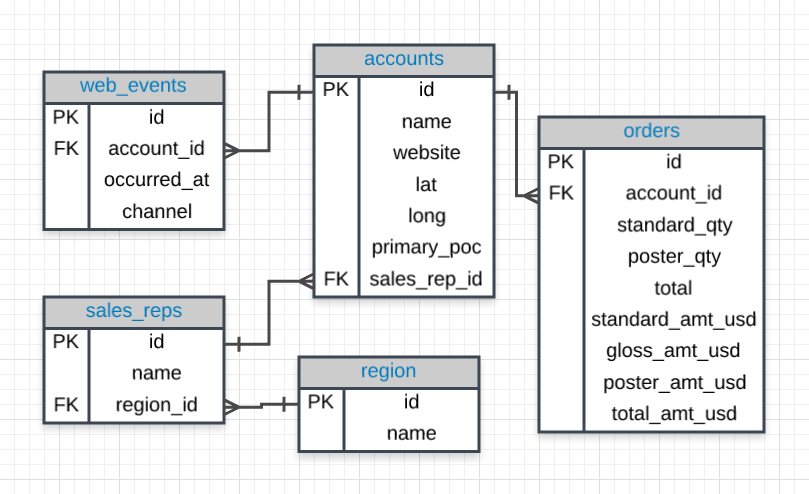
This is one use of the ERD; it allows us quickly to identify the primary keys and the foreign key. A primary key is a unique column in a particular table. In most databases, it is common for the primary key to be the first column in our tables. A foreign key is a column in one table that is a primary key in a different table. The foreign key creates a relationship between two tables, allowing data in one table to be linked to data in another table.
When joining two tables, the most common approach is to link the primary key (PK) of one table with the foreign key (FK) of the other table (generally in an ON statement). Let's use this AI generated tables, `countries` and `languages` to illustrate the concept of foreign keys.

Can you see that the `country_code` is unique to the `countries` table and is the first column as standard practice? That is the primary key of this table. We can also see this column in the `languages` table, this is the foreign key. The `country_code` in the languages table establishes a link to the corresponding country in the countries table.
While it is a common practice to put the primary key as the first column, it is not a strict requirement.
Tip 4: Use Aliases
Using aliases makes our queries more readable and more efficient. It also allows us to be faster when writing queries, it's just advisable to use aliases that make sense so others can pick our codes and understand at a glance. For example, it is advisable to use 'c' or 'co' as our alias for the `countries` table instead of 'l' or 'p'.
Tip 5: Leverage the ON Clause
The ON clause is how we tell SQL what column the link between the tables we are joining is. Using the tables above, let's use the ON clause in the four most common joins.
1. INNER JOIN
SELECT c.country_name, c.population, l.language, l.official_language
  FROM countries c
  LEFT JOIN languages l ON c.country_code = l.country_code;code;e;
2. LEFT JOIN (LEFT OUTER JOIN)
SELECT c.country_name, c.population, l.language, l.official_language
  FROM countries c
 LEFT JOIN languages l ON c.country_code = l.country_code;code;
3. RIGHT JOIN (RIGHT OUTER JOIN)
SELECT c.country_name, c.population, l.language, l.official_language
  FROM countries c
 RIGHT JOIN languages l ON c.country_code = l.country_code;
4. FULL OUTER JOIN
SELECT c.country_name, c.population, l.language, l.official_language
  FROM countries c
  FULL OUTER JOIN languages l ON c.country_code = l.country_code;
We can see the power of aliases in the queries above. Imagine typing countries and languages every time and everywhere instead of 'c' and 'l' respectively.
Tip 6: Filter Early, Join Later
Query optimization is a very big deal when dealing with SQL, there are many optimization techniques and filtering early is one of them. By filtering early, we reduce the amount of data involved during the join operation. So instead of joining two very large tables, we can instead focus on a smaller subset of data that we are interested in.
Suppose we want to retrieve the countries and their official languages, but we are only interested in countries with a population greater than 40 million. The "Filter Early, Join Later" query would first apply the filter on the `countries` table to select only the rows with a population greater than 40 million and then perform the join with the `languages` table.
SELECT c.country_name, c.population, l.language, l.official_language
  FROM countries c
 INNER JOIN languages l ON c.country_code = l.country_code
 WHERE c.population > 40 million;
Tip 7: Performance Implications
Joins can put a huge strain on the performance of our queries, so it is essential to use the appropriate join type, consider the volume of the data, avoid excessive nested joins or subqueries, and optimize join order. In a later series, we will talk about "Understanding Indexes for Performance: Speeding Up Queries with Indexing".
Conclusion
Majority of the world's data live in databases, and analysts always have to join different tables together to answer data questions. JOINs are one powerup easily accessible to any and every data professional, master it and supercharge the data hero in you.
Study Materials
What Next?
Next, we will be exploring a very interesting topic: Working with Functions in SQL: Commonly Used Functions for Data Manipulation.
Happy querying and may your data adventures continue to be magical! 🔮✨
Comments